
Is it safe to upload your credit report to AI? Uploading a full, unredacted credit report creates an unnecessary privacy risk. A credit report contains more than your credit score and payment history. According to the Consumer Financial Protection Bureau (CFPB), it also contains identifying details such as your name, date of birth, addresses, and Social Security number. ChatGPT does not need those details to explain credit utilization, review a collection entry, or help draft a dispute letter.
Say you find a $1,850 collection account on your Experian report that you don't recognize. You upload the entire PDF to ChatGPT and ask whether you should dispute it. The AI reviews the collection entry, but you've also shared personal information from unrelated accounts. A safer approach is to remove your identifiers and share only the disputed entry, its reporting dates, and the information you want checked. You still need to verify the AI's explanation against your records before filing a dispute.
Turning off AI model training does not make an uploaded credit report private. OpenAI provides data controls for eligible ChatGPT users, but those settings do not remove every risk associated with storing or processing sensitive documents.
This guide compares 12 credit-report sharing situations, identifies information to redact, and explains how to check an AI provider's privacy settings. It also covers what to do after uploading an unredacted report, including when to consider a free credit freeze or fraud alert.
Is It Safe to Upload My Credit Report to AI?
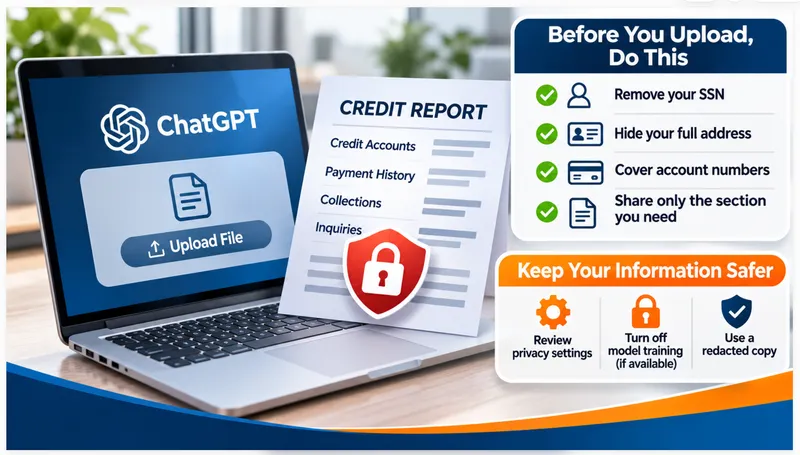
It is not safe to upload your full credit report to an AI chatbot as is. Redact it first, or paste only the section you need.
A credit report holds your name, addresses, birth date, and Social Security number, according to the CFPB. It also lists every account you own.
Consumer AI tools train on what you type unless you opt out. OpenAI states that content from individual ChatGPT accounts is eligible for model training by default, and that you opt out in settings.
Redaction takes about five minutes and keeps the useful part of the report. Here is what this guide covers:
- What your credit report contains
- What happens to data you upload
- A safe, risky, and never-share breakdown
- Twelve real situations, marked safe or not
- A checker that flags what to remove
- How to redact a report step by step
- What to do if you already uploaded yours
- Is it safe to upload your credit report to AI?
- What your credit report contains
- What happens to what you upload
- Safe, risky, and never
- 12 real situations: safe or not
- Safe-to-share checker
- How to redact your credit report
- What to ask AI instead of uploading
- What to do if you already uploaded it
- Credit freeze vs. fraud alert
- AI credit repair apps: questions to ask
- FAQ
- Redact before you share. Remove your SSN, birth date, address, and account numbers.
- Opt out of training. OpenAI states that individual accounts are eligible for training by default.
- A freeze is free. The FTC states that a credit freeze costs nothing and stops new accounts in your name.
- Already uploaded it? Turn off training, freeze your credit, and review your reports.
Is It Safe to Upload Your Credit Report to AI?
No. A full credit report contains your Social Security number, birth date, addresses, and every account, and consumer AI tools treat your content as eligible for training by default. Redact the identifiers first, or share only the one tradeline you need help with.
The risk is not the AI answering your question. The risk is your data sitting in a chat history, a log, or a training set you do not control.
A redacted excerpt carries almost none of that risk. It still gives the AI enough to explain a term or draft a dispute.
What Does Your Credit Report Contain?
A credit report contains identifying details, credit accounts, collection items, public records such as bankruptcies, and inquiries. The CFPB lists your name, current and former addresses, birth date, Social Security number, and phone numbers among the identifying details.
The account section lists each creditor, balance, credit limit, and payment history. The inquiry section lists the companies that checked your report.
Put those pieces together and you have a profile. An identity thief needs far less to apply for credit in your name.
What Happens to What You Upload?
It depends on the tool and your settings. OpenAI states that content from individual ChatGPT accounts is eligible for training by default, and that opting out stops new conversations from being used. Business offerings are not used for training.
OpenAI's page says you opt out through the privacy portal by choosing "do not train on my content," or through the data controls in settings. After you opt out, new conversations are not used to train its models.
The same page says Team, Enterprise, and API products are not used for training. It does not single out uploaded files, so treat an uploaded report like any other content you share.
What Is Safe, Risky, and Never to Share?
Redacted excerpts are safe, full reports are risky, and identifiers and logins are never acceptable. Sort every item on your report into one of those three tiers before you share it with an AI tool.
| Tier | What It Looks Like | Do This |
|---|---|---|
| Safe | One redacted tradeline: creditor type, status, dates, balance range | Share it, with training off |
| Risky | The full PDF, even with your name removed | Do not upload. Extract the one section you need |
| Never | SSN, birth date, full account numbers, bureau or bank logins, security answers | Replace with placeholders every time |
A "redacted" PDF with black boxes still hides text in some files. Copy the text you need into a plain document and type the placeholders yourself.
Is It Safe? 12 Real Situations
Sharing a question, a term, or a redacted tradeline is safe with training off. Sharing the full report, your identifiers, or any login is not. Use the table to match your exact situation, then run the checker below.
| Situation | Safe? | Why, and What to Do |
|---|---|---|
| Ask the AI to define "date of first delinquency" | Safe | No personal data leaves your device |
| Type "$4,000 balance on a $5,000 limit" and ask for a payoff plan | Safe | Rounded numbers, no identifiers |
| Paste one tradeline with [CREDITOR] and [ACCOUNT ENDING 1234] | Safe | Turn training off first |
| Paste a dispute letter draft with placeholders | Safe | Add your real details in a document on your own device |
| Use a Team, Enterprise, or API workspace | Lower risk | OpenAI states these products are not used for training. Still redact identifiers |
| Paste your list of hard inquiries with lender names | Redact first | The list shows who you applied to and when. Share only the count |
| Use an AI credit repair app you found online | After checks | Verify the owner, privacy policy, and pricing before you share anything |
| Upload the full PDF from AnnualCreditReport.com | Not safe | It holds every identifier and every account. Copy one section instead |
| Screenshot the top of the report with your name, address, and SSN | Not safe | That section is the identity data a thief needs |
| Paste full account numbers to "check" them | Not safe | Use the last four digits only |
| Paste the final dispute letter with your real name, address, and SSN | Not safe | Finish the letter offline |
| Give an AI tool your bureau or bank login | Never | A login hands over your accounts. Download the report yourself |
What Are You About to Share? A Quick Safety Checker
Check every item you plan to paste or upload. The checker flags anything unsafe and tells you what to remove. It runs in your browser and sends nothing anywhere.
Items to remove first
Safer items
Settings
How Do You Redact a Credit Report Before Using AI?
Copy only the section you need into a blank document, replace every identifier with a placeholder, and check the result line by line before you paste it. The process takes about five minutes for one tradeline.
Here's how to do it:
- Turn off training. Change the data control in settings before you paste anything.
- Pick one problem. Choose a single tradeline, such as a late payment you dispute.
- Copy the text into a blank document. Do not upload the PDF.
- Replace identifiers. Swap names, addresses, and account numbers for placeholders.
- Round the numbers. Use "about $4,000" in place of the exact balance when the exact figure does not matter.
- Read it twice. Search the document for digits and your last name before you paste.
- ☐Full name replaced with [NAME]
- ☐Current and former addresses removed
- ☐Birth date and Social Security number removed
- ☐Account numbers replaced with [ACCOUNT ENDING 1234]
- ☐Phone numbers and email addresses removed
- ☐No bureau, bank, or app logins anywhere
- ☐Training turned off in the AI tool's settings
What Should You Ask AI Instead of Uploading Your Report?
Ask for explanations and drafts, not analysis of your full file. Describe the problem in your own words, and let the AI explain a term, draft a letter, or build a payoff schedule from rounded numbers.
I have a [type of account, such as a credit card] with a [late payment / collection / wrong balance] on my credit report. Explain what that entry means and how it is disputed under the Fair Credit Reporting Act.
Do not ask for my name, address, or account numbers. I will add those myself. Keep the answer under 200 words.
Verify the AI's answer against the CFPB before you act. OpenAI states that ChatGPT sometimes makes up quotes and citations.
What Should You Do If You Already Uploaded Your Credit Report?
Turn off training, freeze your credit at all three bureaus, and review your reports for accounts you do not recognize. A freeze is free and blocks new accounts in your name. If you find fraud, report it at IdentityTheft.gov.
- Turn off training. Opt out in the tool's data controls so new conversations stay out of training.
- Freeze your credit. Contact Equifax, Experian, and TransUnion. The FTC states that a freeze costs nothing and does not affect your score.
- Pull your reports. Check all three at AnnualCreditReport.com for accounts and inquiries you do not recognize.
- Watch for 12 months. Review your accounts and statements monthly.
- Report fraud fast. Use IdentityTheft.gov if anything looks wrong.
Credit Freeze vs. Fraud Alert: Which Do You Need?
A freeze blocks new accounts in your name. A fraud alert makes lenders verify your identity first. The FTC states that a freeze is free, and an initial fraud alert lasts one year. For a data exposure, the freeze gives stronger protection.
| Feature | Credit Freeze | Fraud Alert |
|---|---|---|
| Cost | Free | Free |
| What it does | Nobody opens a new account in your name, including you | Lenders must verify your identity before opening credit |
| How long | Until you lift it | One year for an initial alert; seven for an extended alert |
| Who you contact | All three bureaus | One bureau, which tells the others |
| Effect on your score | None | None |
Lift the freeze at the one bureau a lender uses when you apply for credit, then refreeze it. Our guide to secondary bureau freezes covers the specialty bureaus that the big three freezes miss.
Are AI Credit Repair Apps Safe to Use?
Check four things before you give any app your report or logins: who owns it, where it stores your data, what it charges, and whether it follows credit repair law. The CFPB states that credit repair companies cannot collect payment until they complete the promised services.
- ✓Ownership. Find a real company name, address, and support contact.
- ✓Data policy. Read what the privacy policy says about training and sharing.
- ✓Pricing. Walk away from upfront fees. The CFPB calls all upfront payment before services illegal.
- ✓Your rights. The CFPB states that you have three business days to cancel a credit repair contract at no charge.
No app guarantees a score increase or removes accurate negatives. The CFPB states that no one does either.
Want a Human to Review Your Credit Report?
You don't need to upload your report to a chatbot to understand it. ASAP Credit Repair USA helps you review your three-bureau reports for inaccurate balances, payment statuses, and unfamiliar accounts, so you know what deserves a dispute.
Review Your Credit Report → Credit report corrections do not guarantee a score increase or the removal of accurate information.Frequently Asked Questions About Uploading a Credit Report to AI
Is it safe to upload my credit report to ChatGPT?
Not as is. A full report holds your Social Security number, birth date, addresses, and every account. OpenAI states that individual accounts are eligible for training by default. Turn training off, remove every identifier, and paste only the one section you need.
What should I remove from a credit report before using AI?
Remove your name, current and former addresses, birth date, Social Security number, phone numbers, and account numbers. The CFPB lists these among the identifying details on a report. Replace each with a placeholder such as [NAME] or [ACCOUNT ENDING 1234], then read the document twice.
Does ChatGPT train on my credit report?
Yes, if you use an individual account with training on. OpenAI states that content from individual accounts is eligible for training by default, and opting out stops new conversations from being used. Team, Enterprise, and API products are not used for training.
Is it safe to paste only part of my credit report?
A redacted excerpt carries far less risk. Paste one tradeline with the name, address, and account number replaced by placeholders, and turn training off first. Keep the numbers rounded when the exact balance does not matter. Never paste the identifying section at the top of the report.
Does sharing my credit report with AI hurt my credit score?
No. A copy you already hold triggers no inquiry, because no bureau or lender is involved when you share it. The privacy risk is the real cost. Anyone who obtains your identifiers uses them to open accounts, and those accounts and hard inquiries damage your score.
What if I already uploaded my credit report to an AI tool?
Act the same day. Turn off training in the tool's data controls, freeze your credit at Equifax, Experian, and TransUnion, and pull your reports from AnnualCreditReport.com. Review accounts monthly for a year. Report any fraud at IdentityTheft.gov to get a recovery plan.
Should I freeze my credit if I uploaded my report?
Yes. The FTC states that a credit freeze is free, does not affect your score, and stops anyone from opening a new account in your name. Contact all three bureaus. Lift the freeze at the one bureau a lender uses when you apply, then refreeze it.
Are AI credit repair apps safe?
Safety varies by app. Check who owns it, what its privacy policy says about training, and what it charges. The CFPB states that credit repair companies cannot collect payment before completing services, and that no one guarantees a score increase. Never give an app your bureau or bank logins.
- How to Do a Credit Report Clean UpSix steps to review and dispute your reports.
- What Is a Secondary Bureau Freeze?Freeze the specialty bureaus too.
- Dispute Credit Report Errors GuideHow to dispute a wrong balance or status.
- DIY Credit Repair: Fix Your Credit Like a ProA step-by-step guide to disputing on your own.
- Consumer Financial Protection Bureau — What is a credit report?
- Consumer Financial Protection Bureau — How can I tell a credit repair scam from a reputable credit counselor?
- Federal Trade Commission — Credit freezes and fraud alerts
- Federal Trade Commission — Get a credit freeze to stop identity thieves
- IdentityTheft.gov — Identity theft recovery steps
- OpenAI Help Center — How your data is used to improve model performance
- OpenAI Help Center — Disable model training
- OpenAI Help Center — Does ChatGPT tell the truth?
- AnnualCreditReport.com — Free credit reports
- Google Search Central — Creating helpful, reliable, people-first content